Animations
Animation Troubleshooting
This section is intended to contain some tips, tricks, and possible pitfalls when it comes to authoring animations in the modkit.
Animation stuck looping in game - Section Name ‘None’
In UE4, animation montages could have names for sections that were set to ‘None’. In UE5, this will cause an animation to loop infinitely. in game This is because of a quirk in the selection of the next animation section, which defaults to ‘None’ - because a section with the name ‘None’ exists, it will jump to that section over and over again.
To fix this, you should be able to simply rename the section to anything other than ‘None’.
Animation Notify effects not running on Dedicated Server - Queued vs. Branching Point
Animation Notifies and Notify States can select the checkbox to Trigger on Dedicated Server in their settings. This should usually cause the effects of this notify to trigger on the server, but under certain circumstances, these notifies can instead be skipped on the server.
By default, most Anim Notifies and Anim Notify States will be set to the Montage Tick Type of Queued. Queued notifies, by design, are not guaranteed to be executed on the frame they are requested. Additionally, due to an engine quirk, on dedicated server, Queued notifies can be sometimes be skipped entirely.
In order to guarantee that a gameplay-important Anim Notify or Anim Notify State fires on the server, you will want to ensure that both Trigger on Dedicated Server is checked, and that Montage Tick Type is set to Branching Point. This should guarantee the timing and that the notify will fire.
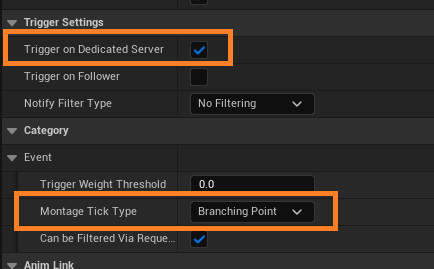
As a general rule of thumb, it is good practice to have gameplay-critical notifies be set to Branching Point, while cosmetic or less gameplay-critical notifies can be set to Queued. However, do note that the engine does not allow multiple Branching Point notifies to run on the same montage at the same time.