Requesting Permissions
Before your mod can make an HTTP request, the player has to approve the origin it wants to contact. That happens in two stages: you declare the origins in your mod, and the game asks the player about them the next time they launch.
Declaring origins
Open the Conan Exiles Dev Kit window and find the Requested HTTP origins section.
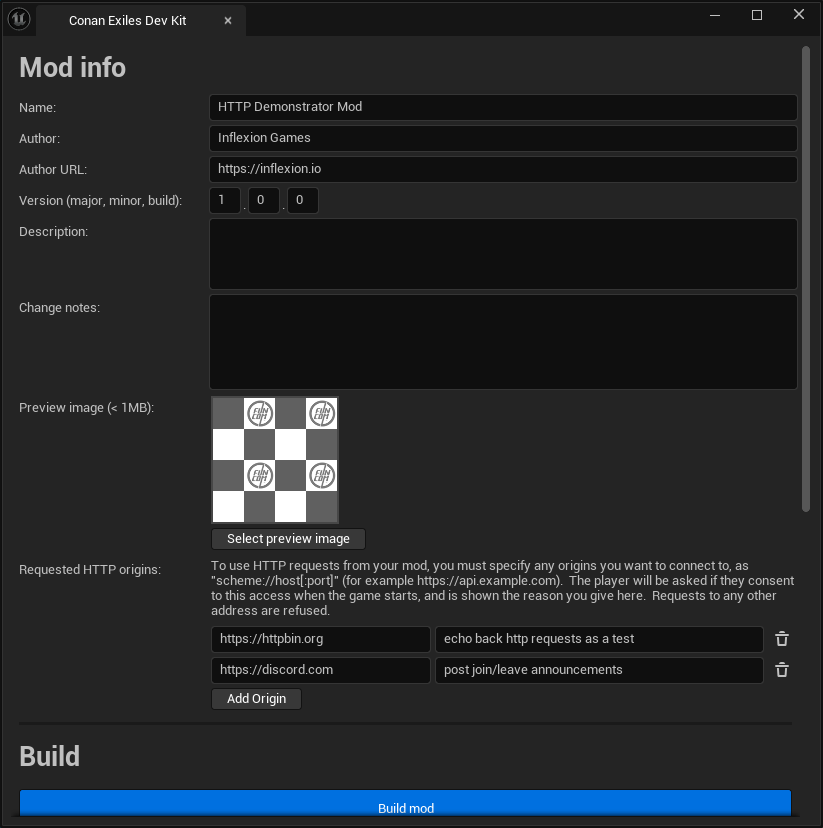
Hit Add Origin for each address your mod needs, and fill in the two fields:
| Field | What to put in it |
|---|---|
| Origin | scheme://host[:port] — for example https://api.example.com. No path, query, or fragment. If you paste a full URL, the trailing path is trimmed off for you when you commit the field. |
| Reason | Why your mod needs it. This is shown to the player, verbatim, when they are asked. Limited to 300 characters. |
Write the reason for the player, not for yourself. Something like “upload your best times to the mod’s leaderboard” tells them what they are agreeing to. A generic “API access” does not, and gives them no reason to say yes.
In modinfo.json
The Dev Kit writes your declarations into the mod’s modinfo.json as a requestedHttpOrigins array. You do not normally need to edit this by hand, but it is plain JSON if you would rather:
{
  "name": "My HTTP Mod",
  "folderName": "MyMod",
  "requestedHttpOrigins": [
    {
      "origin": "https://api.example.com",
      "reason": "upload your best times to the mod's leaderboard."
    }
  ]
}
Declarations are cleaned up when the mod is mounted: origins are normalized to their canonical scheme://host:port form, duplicates are dropped, anything that will not parse as a valid origin is discarded, reasons are truncated, and the list is currently capped at sixteen. An origin that gets discarded here is simply never asked about, and requests to it will fail with NotApprovedByPlayer.
What the player sees
When the player starts the game, any declared origin they have not already answered for is put to them at the main menu, one question per mod per origin, showing your mod’s name, the origin, and your reason.
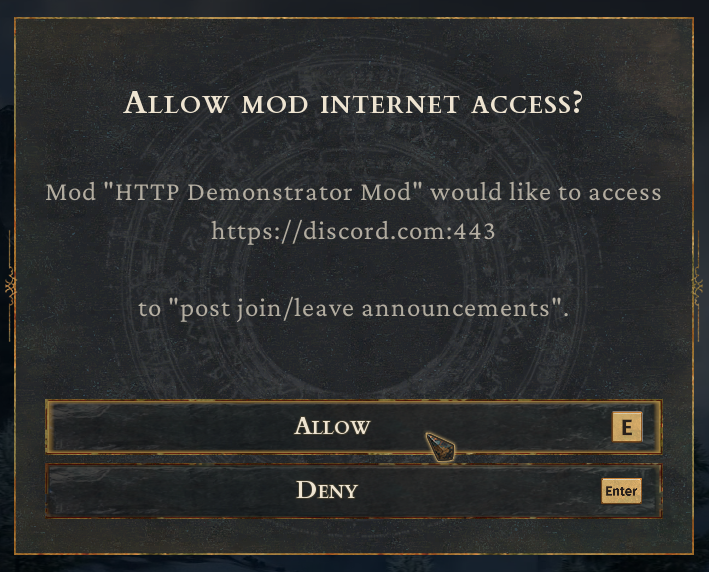
Their answer is remembered. A denial is remembered too, so the same question is not asked at every launch. The practical consequence is that a player who says no is not asked again, even after a mod update, unless they clear the answer themselves. Adding a new origin to your mod does produce a new prompt, because that origin has no answer yet.
Where permissions are stored
Permission answers live in ModHttp.ini, under the game’s Saved/Config/<Platform>/ directory:
| Where you are running | Path |
|---|---|
| Packaged game | ConanSandbox/Saved/Config/Windows/ModHttp.ini |
| Dev Kit / editor | UE4/Saved/Config/WindowsEditor/ModHttp.ini |
| Windows dedicated server | ConanSandbox/Saved/Config/WindowsServer/ModHttp.ini |
| Linux dedicated server | ConanSandbox/Saved/Config/LinuxServer/ModHttp.ini |
This file is the only thing consulted when a request is made. It has one section per mod, named after the mod’s folder:
[MyMod]
AllowedOrigin="https://api.example.com"
AllowedOrigin="https://cdn.example.com"
DeniedOrigin="https://telemetry.example.com"
It is safe to edit or delete. Deleting the file, the section, or a single line clears those answers, and the player is asked again at the next launch.
Quote the value! An unquoted // is treated as the start of a comment by the ini parser, so AllowedOrigin=https://api.example.com is silently read as an empty entry. The game always writes the quotes, make sure to remember them if editing the file manually.
Testing in the Dev Kit
The Dev Kit has no consent prompt as it is part of the game’s main menu, which the editor may not run. To test against a real allowlist, write the entry yourself into UE4/Saved/Config/WindowsEditor/ModHttp.ini:
[MyMod]
AllowedOrigin="https://api.example.com"
The section name is your mod’s folder name, which is the same thing as folderName in modinfo.json.
When testing in the Dev Kit all requests are attributed to the current mod, so you may need to add other mods origins to your mods section if you rely on another mod that makes requests. The Dev Kit must be restarted after updating the ModHttp.ini.
Dedicated servers
A dedicated server has no main menu and never prompts, so mods on a server can make no HTTP requests until the server operator adds the entries by hand. A warning will be written to the server logs describing the required origin and syntax to add to the ModHTTP.ini file.
The file is the same ModHttp.ini described above, in the server’s Saved/Config/WindowsServer/ or Saved/Config/LinuxServer/ directory:
[MyMod]
AllowedOrigin="https://api.example.com"
Restart the server after editing. If your mod does server-side HTTP work, document the origins it needs somewhere your server operators will find them. They will get a warning log message with your reasoning, but that may be overlooked.
The same instructions written for server operators are in the server administration documentation, which is a reasonable thing to point them at.